VG3 Software Manual
Software Update Log
Software Introduction
VisionGroup3 Vision Software Platform
Menu Bar
Quick Options Preview
Flow Tree and Global Flow Tree
Function Tree
Software Version Description
Function Addition Tree
Function Information
Image Display Area
AI Model Tree
Global Variable Tree
Camera
Coordinate System Tree
Hardware Communication Configuration
Usage and Troubleshooting of Various Communication Simulation Software
Hardware Management Device Connection Test
String Monitor Operation
Digital IO Monitor Operation
Register Monitor Operation
Image Processing
Image Acquisition and Display
Camera Image Acquisition
Camera Label Image Acquisition
Display Image
Window Clear
Read Camera Image
Video Processing
Video Reading
Video Download
Video Acquisition
Video Generation
Color Detection
Color Image Cropping
Color Selection
KNN Color Selection
Color Conversion
Block Sequence Detection
Color Blob Detection
Category Color
Image Preprocessing
Image Cropping
Image Merge
Image Ring Unfold
Image Filtering
Image Transformation
Camera Distortion Calibration
Perspective Distortion Calibration
Image Correction
Region Processing
Geometry to Region
Region Transformation
Region Screening
Region Operation
Blob Region
Region Creation
Region Generation
Simple Detection
Blob Detection
Blob Multi-Region Detection
Image Contrast
Image Brightness
Line Burr Detection
Circular Burr Detection
Pixel Difference Detection
Positioning and Measurement
Matching
Feature Matching
Optimized Feature Matching
Single Target Template Matching
Multi-Template Feature Matching
Geometric Extraction
Extract Line
Extract Circle
Extract Arc
Extract Ellipse
Edge Extraction
Extract Parallel Lines
Line Intersection
Extract Quadrilateral
Point-Line Caliper
Line-Line Caliper
Edge Distance Counting
Measurement Calibration
Farthest Nearest Point Extraction
Geometric Calculation
Custom Point
Custom Line
Custom Circle
Custom Pose
Custom Rotated Rectangle
Custom Coordinate System
Custom Rectangle Array
Line-Line Intersection
Line-Line Angle
Angle Bisector
Line-Line Distance
Point-Point Distance
Point-Line Distance
Point-Circle Distance
Point-Circle Tangent
Line-Circle Distance
Line-Circle Intersection
Circle-Circle Intersection
Position Correction
Point + Angle Correction
Two-Point Position Correction
Two-Line Position Correction
Positioning Guide
Camera Calibration
Long Radius Calibration (Auto)
Long Radius Calibration (Manual)
Camera Simple Calibration
N-Point Calibration
Calibration Transfer
Calibration Verification
Calibration Reference
Calibration Calculation
Calibration Conversion
Camera Calibration Conversion
Mapping
Mapping Reference
Mapping Conversion
Mechanical Transfer
UVW Calculation
Learn Reference Target
Single Camera Pick
Single Camera Pick (Eye-in-Hand)
Single Camera Pick and Place
Single Camera Correction
Multi-Camera Correction
Dual Camera Alignment
Mechanical Point Alignment
Multi-Camera Alignment
Mechanical Point Alignment (Weight)
Multi-Region Alignment
Identification Tools
Code Reading Tool
1D Barcode Quick Recognition
2D Barcode Quick Recognition
All Type Code Reading
Barcode Grading (AI)
Character Recognition
Matching Character Recognition
Deep Learning
Detection
Object Detection (AI)
Rotated Object Detection (AI)
Human Keypoint Detection[AI]
Segmentation
Image Segmentation AI
Classification
Image Classification[AI]
Recognition
Character Recognition[AI]
Auxiliary Tools
AI-Assisted Annotation
Auxiliary Tools
Control Statements
Flow Unit
Conditional Detection
Complex Condition Detection
Loop Detection
Break
Continue
Combo Box
Flow Delay
Jump Module
Flow Reset
Stop Software
Start Detection
Pause Software
Process Trigger
Async Flow Trigger
Recipe switching
Loop Position Filtering
System Tool
DEBUG INFO
System Time
System Info
Sequence Tools
Data Sequence
Data Sequence Calculation
Continuous state change
Continuous status confirmation
Spatial Displacement Change
Sequence Action
Mathematics and Data
Logical relationship
Arithmetic Operations
Relational Judgment
Absolute Value
Relative Value
Trigonometric Functions
Integer Bitwise Operation
Data Processing
Data Summary
Label Filters
Rotated Label Filtering
Multi-ROI Rotated Label Filtering
Data Calculation
Lua Script Tool
Variable Processing
Linear Variable Creation
Linear Variable Writing
Linear Variable Array Insertion
Linear Variable Array Deletion
Linear Variable Array Value Setting
Global Variable Reading
Global Variable Writing
Global Variable Invalidation
Global Variable Array Insertion
Global Variable Array Deletion
Global Variable Array Value Setting
Global Image Array Preview
Data Binding
Data Unbinding
Array and String
Array Insert
Array Slice
Array Remove
Array Get Value
Array and Data Concatenation
String Split/Conversion
Data to String
String to Data
String Split
String Find
String Substring
Result Analysis
Display Data
Display Array Data
Save Image
Statistical Counting
Display Result on Image
Display Results on Window
Detection Screenshot
Hardware Control
String Communication Read
String Command Control
String Communication Write
Register Communication Read
Register Communication Write
Register Command Control
Siemens DB Block Read
Siemens DB Block Write
Light Controller Control
Digital Input Read
Digital Output Read
Wait for Digital Input
Wait for Digital Output
Digital Output Write
Voice Broadcast
Motion Control
Axis Motion
Stop Axis
Wait for Axis Stop
Set Axis Parameters
Axis Enable
Multi Axis Motion
AI Trainer
AI Trainer Operation Guide
Deep Learning Labeling Principles and Details
Run Interface Edit
Enter Design Interface
Understanding Interface Composition
Object List
Main Menu
Others Design Window Property List Event Script
Widget List
Image Widget
Run Control Widget
Button Widget
Status Monitor Widget
Label Widget
Condition Label Widget
BOOL Setting Widget
Integer Setting Widget
Float Setting Widget
String Setting Widget
Dropdown Setting Control Widget
Integer Slider Widget
Float Slider Widget
Container Widget
Combo Box Widget
Tab Widget
Vertical Layout Widget
Horizontal Layout Widget
Vertical Spacer Widget
Horizontal Spacer Widget
Login Widget
Image Box Widget
Log Widget
Pie Chart Widget
Bar Line Chart Widget
Static Table Widget
Dynamic Table Widget
Circular Progress Widget
Preview Mode
Script Mode
Run Mode
Custom Logo
Software FAQ
How to Solve Global Camera Fly Shooting Smear Problem
Maximize Graphics Card Performance Settings
Method to Enable Virtual Memory
Vision Software Freeze Troubleshooting Steps
Secondary Development
VisionGroup3 CSharp Secondary Development Manual
VG3 SDK Development Guide V1.0 Cpp
VG3 Module Plugin Development
本站点使用 MrDoc 构建
-
+
首页
2D Barcode Quick Recognition
## 2D Barcode Quick Recognition Identifies 2D barcode (QR code, Data Matrix, etc.) information within a specified region of an image. ## Module Principle This module performs the localization and decoding process for 2D barcodes. ### Algorithm Workflow 1. Locate the precise region of the 2D barcode in the image based on the generation rules of the selected barcode type. 2. Decode and perform error correction based on the characteristics of the code. 3. Output the decoded string. ## Usage Scenarios The 2D barcode recognition module is used to locate and identify 2D barcodes within specified regions. It tolerates target 2D barcodes rotated at arbitrary angles and those with a certain degree of tilt. ### Preceding Modules The preceding modules for this module are typically camera image acquisition or image preprocessing modules. ## Parameter Configuration Description ### 2D Barcode Type: * **QR:** A Quick Response matrix code characterized by square finder patterns (return-shaped blocks) at three corners. * **Aztec:** A matrix 2D barcode characterized by a bullseye-style locator in the center. * **ECC200:** A 2D matrix code (Data Matrix) characterized by an "L" shaped boundary formed by solid lines on two adjacent sides. * **PDF417:** A stacked linear 2D barcode, mainly used in identity documents and logistics. * **GS1 QR:** A QR code supporting GS1 application identifiers syntax, mainly used in retail product packaging. * **GS1 Aztec:** An Aztec code supporting GS1 application identifiers syntax, mainly used in medical labeling, logistics, and computing fields. * **GS1 DataMatrix:** A Data Matrix code supporting GS1 application identifiers syntax, mainly used in industrial traceability. ### Max Barcodes per ROI: The maximum number of 2D barcodes to identify within a single detection region. ### Prefix Character Filter: Filters 2D barcode recognition results to include only those starting with specified characters. ### Character Count Judgment: Criteria for judging the number of characters in the 2D barcode recognition result. ### 2D Barcode Position Filter: * **Ignore:** No position filtering is applied to the recognition results. * **Topmost Barcode:** Retains only the 2D barcode located at the topmost position in the results. * **Bottommost Barcode:** Retains only the 2D barcode located at the bottommost position in the results. * **Leftmost Barcode:** Retains only the 2D barcode located at the leftmost position in the results. * **Rightmost Barcode:** Retains only the 2D barcode located at the rightmost position in the results. ### 2D Barcode Color: * **Any:** Recognizes 2D barcodes that are either black or white. * **Black:** Recognizes only black 2D barcodes. * **White:** Recognizes only white 2D barcodes. 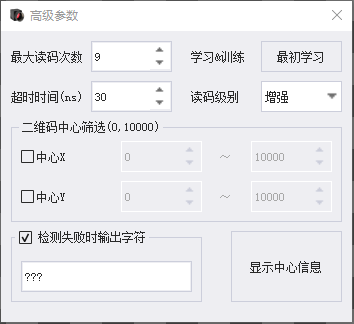 ### Max Read Attempts: The maximum number of times to preprocess the image and re-attempt recognition if no 2D barcode result is found. ### Learn & Train: Click this button to learn recognition parameters if the 2D barcode cannot be identified. ### Timeout: The maximum detection time allowed for recognizing a 2D barcode. ### Read Grade: * **Standard:** Uses parameters for standard mode recognition. * **Enhanced:** Uses parameters for enhanced mode recognition. * **Maximum:** Uses parameters for maximum mode recognition. * **Extreme:** Uses image enhancement techniques along with maximum mode parameters. ### 2D Barcode Center Filter: * **Center X:** Filters recognition results where the horizontal coordinate of the 2D barcode center falls within this range. * **Center Y:** Filters recognition results where the vertical coordinate of the 2D barcode center falls within this range. ### Output String on Failure: The character string to output when no 2D barcode is recognized. ### Display Center Info: Displays the center coordinates of all recognized 2D barcodes to facilitate viewing for center filtering. 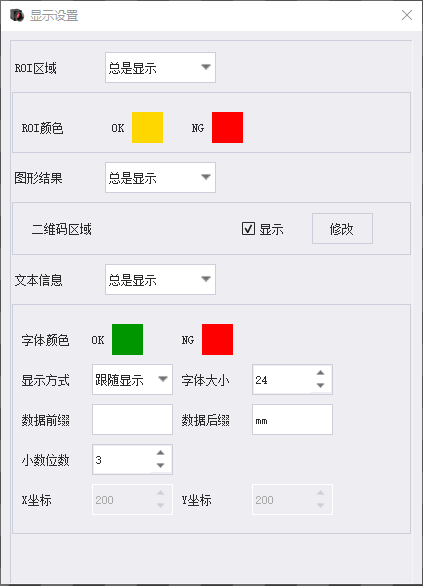 ### Display Settings: Configures parameters related to ROI, 2D barcode regions, and 2D barcode information display. 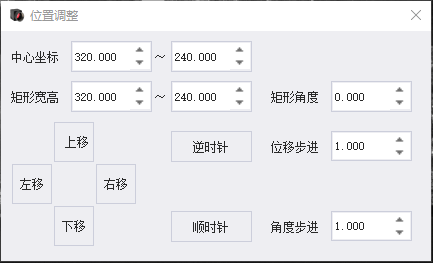 ### Position Adjustment: Manually adjusts ROI-related parameters. ### ROI Type: * **Rotated Rectangle:** A rectangle that can be moved, resized, and rotated. Its angle can be any value from 0 to 360 degrees. ### ROI Mode: * **Single ROI:** Only one 2D barcode recognition detection region. * **Array ROI:** Supports multiple 2D barcode recognition regions. ### ROI Source: * **Manual ROI:** In this mode, ROI-related parameters can be directly set within this module. * **Referenced ROI:** In this mode, ROI-related parameters cannot be modified in this module; they must be imported from an upstream module. ### Position Correction: * **Disabled:** No position adjustment is made to the set ROI. * **Pose Correction:** Adjusts the position of the set ROI based on the input value. ## Output Description ### Run Result: Indicates whether the 2D barcode recognition was successful. ### 2D Barcode Count: The number of 2D barcodes recognized. ### Character Count: The number of characters in the recognized 2D barcode result. ### Character Output: The recognized 2D barcode result string. ### 2D Barcode Region Array: The image regions where the recognized 2D barcodes are located. ### ROI Count: The number of ROIs. ### ROI Status Array: Indicates whether a 2D barcode was recognized in each ROI. ## Precautions 1. When using this module, please place the licensed `halcon.dll` and `halconc.dll` files obtained from MVTec into the software release package, then restart the software to enable functionality. 2. This module is only supported on Windows 10 or later operating systems. --- Click here to jump to the corresponding Chinese manual page: [2D Barcode Quick Recognition](/doc/153)
唐红
2026年3月12日 15:24
转发文档
收藏文档
上一篇
下一篇
手机扫码
复制链接
手机扫一扫转发分享
复制链接
Markdown文件
PDF文档(打印)
分享
链接
类型
密码
更新密码