VG3 Software Manual
Software Update Log
Software Introduction
VisionGroup3 Vision Software Platform
Menu Bar
Quick Options Preview
Flow Tree and Global Flow Tree
Function Tree
Software Version Description
Function Addition Tree
Function Information
Image Display Area
AI Model Tree
Global Variable Tree
Camera
Coordinate System Tree
Hardware Communication Configuration
Usage and Troubleshooting of Various Communication Simulation Software
Hardware Management Device Connection Test
String Monitor Operation
Digital IO Monitor Operation
Register Monitor Operation
Image Processing
Image Acquisition and Display
Camera Image Acquisition
Camera Label Image Acquisition
Display Image
Window Clear
Read Camera Image
Video Processing
Video Reading
Video Download
Video Acquisition
Video Generation
Color Detection
Color Image Cropping
Color Selection
KNN Color Selection
Color Conversion
Block Sequence Detection
Color Blob Detection
Category Color
Image Preprocessing
Image Cropping
Image Merge
Image Ring Unfold
Image Filtering
Image Transformation
Camera Distortion Calibration
Perspective Distortion Calibration
Image Correction
Region Processing
Geometry to Region
Region Transformation
Region Screening
Region Operation
Blob Region
Region Creation
Region Generation
Simple Detection
Blob Detection
Blob Multi-Region Detection
Image Contrast
Image Brightness
Line Burr Detection
Circular Burr Detection
Pixel Difference Detection
Positioning and Measurement
Matching
Feature Matching
Optimized Feature Matching
Single Target Template Matching
Multi-Template Feature Matching
Geometric Extraction
Extract Line
Extract Circle
Extract Arc
Extract Ellipse
Edge Extraction
Extract Parallel Lines
Line Intersection
Extract Quadrilateral
Point-Line Caliper
Line-Line Caliper
Edge Distance Counting
Measurement Calibration
Farthest Nearest Point Extraction
Geometric Calculation
Custom Point
Custom Line
Custom Circle
Custom Pose
Custom Rotated Rectangle
Custom Coordinate System
Custom Rectangle Array
Line-Line Intersection
Line-Line Angle
Angle Bisector
Line-Line Distance
Point-Point Distance
Point-Line Distance
Point-Circle Distance
Point-Circle Tangent
Line-Circle Distance
Line-Circle Intersection
Circle-Circle Intersection
Position Correction
Point + Angle Correction
Two-Point Position Correction
Two-Line Position Correction
Positioning Guide
Camera Calibration
Long Radius Calibration (Auto)
Long Radius Calibration (Manual)
Camera Simple Calibration
N-Point Calibration
Calibration Transfer
Calibration Verification
Calibration Reference
Calibration Calculation
Calibration Conversion
Camera Calibration Conversion
Mapping
Mapping Reference
Mapping Conversion
Mechanical Transfer
UVW Calculation
Learn Reference Target
Single Camera Pick
Single Camera Pick (Eye-in-Hand)
Single Camera Pick and Place
Single Camera Correction
Multi-Camera Correction
Dual Camera Alignment
Mechanical Point Alignment
Multi-Camera Alignment
Mechanical Point Alignment (Weight)
Multi-Region Alignment
Identification Tools
Code Reading Tool
1D Barcode Quick Recognition
2D Barcode Quick Recognition
All Type Code Reading
Barcode Grading (AI)
Character Recognition
Matching Character Recognition
Deep Learning
Detection
Object Detection (AI)
Rotated Object Detection (AI)
Human Keypoint Detection[AI]
Segmentation
Image Segmentation AI
Classification
Image Classification[AI]
Recognition
Character Recognition[AI]
Auxiliary Tools
AI-Assisted Annotation
Auxiliary Tools
Control Statements
Flow Unit
Conditional Detection
Complex Condition Detection
Loop Detection
Break
Continue
Combo Box
Flow Delay
Jump Module
Flow Reset
Stop Software
Start Detection
Pause Software
Process Trigger
Async Flow Trigger
Recipe switching
Loop Position Filtering
System Tool
DEBUG INFO
System Time
System Info
Sequence Tools
Data Sequence
Data Sequence Calculation
Continuous state change
Continuous status confirmation
Spatial Displacement Change
Sequence Action
Mathematics and Data
Logical relationship
Arithmetic Operations
Relational Judgment
Absolute Value
Relative Value
Trigonometric Functions
Integer Bitwise Operation
Data Processing
Data Summary
Label Filters
Rotated Label Filtering
Multi-ROI Rotated Label Filtering
Data Calculation
Lua Script Tool
Variable Processing
Linear Variable Creation
Linear Variable Writing
Linear Variable Array Insertion
Linear Variable Array Deletion
Linear Variable Array Value Setting
Global Variable Reading
Global Variable Writing
Global Variable Invalidation
Global Variable Array Insertion
Global Variable Array Deletion
Global Variable Array Value Setting
Global Image Array Preview
Data Binding
Data Unbinding
Array and String
Array Insert
Array Slice
Array Remove
Array Get Value
Array and Data Concatenation
String Split/Conversion
Data to String
String to Data
String Split
String Find
String Substring
Result Analysis
Display Data
Display Array Data
Save Image
Statistical Counting
Display Result on Image
Display Results on Window
Detection Screenshot
Hardware Control
String Communication Read
String Command Control
String Communication Write
Register Communication Read
Register Communication Write
Register Command Control
Siemens DB Block Read
Siemens DB Block Write
Light Controller Control
Digital Input Read
Digital Output Read
Wait for Digital Input
Wait for Digital Output
Digital Output Write
Voice Broadcast
Motion Control
Axis Motion
Stop Axis
Wait for Axis Stop
Set Axis Parameters
Axis Enable
Multi Axis Motion
AI Trainer
AI Trainer Operation Guide
Deep Learning Labeling Principles and Details
Run Interface Edit
Enter Design Interface
Understanding Interface Composition
Object List
Main Menu
Others Design Window Property List Event Script
Widget List
Image Widget
Run Control Widget
Button Widget
Status Monitor Widget
Label Widget
Condition Label Widget
BOOL Setting Widget
Integer Setting Widget
Float Setting Widget
String Setting Widget
Dropdown Setting Control Widget
Integer Slider Widget
Float Slider Widget
Container Widget
Combo Box Widget
Tab Widget
Vertical Layout Widget
Horizontal Layout Widget
Vertical Spacer Widget
Horizontal Spacer Widget
Login Widget
Image Box Widget
Log Widget
Pie Chart Widget
Bar Line Chart Widget
Static Table Widget
Dynamic Table Widget
Circular Progress Widget
Preview Mode
Script Mode
Run Mode
Custom Logo
Software FAQ
How to Solve Global Camera Fly Shooting Smear Problem
Maximize Graphics Card Performance Settings
Method to Enable Virtual Memory
Vision Software Freeze Troubleshooting Steps
Secondary Development
VisionGroup3 CSharp Secondary Development Manual
VG3 SDK Development Guide V1.0 Cpp
VG3 Module Plugin Development
本站点使用 MrDoc 构建
-
+
首页
Image Filtering
## Image Filtering Image filtering is to perform preset mathematical operations on each pixel (or pixel neighborhood) in the image, screen and retain useful information, remove useless interference, and finally output an image that meets subsequent processing requirements ## Module Principle Only spatial domain filtering is considered, processing is performed in the spatial domain of the image (i.e., the two-dimensional coordinate domain of pixels), and mathematical operations (such as addition, subtraction, multiplication, division, weighted average, sorting, etc.) are performed on each pixel point and its surrounding neighborhood pixels, and the operation result is used to replace the original pixel value. ## Usage Scenarios During shooting (camera noise), transmission (signal interference), and segmentation (binarization noise), various useless noises (such as salt and pepper noise: black and white spots, Gaussian noise: uniform blur interference) will be generated. In order to remove these noises and make the image smoother and clearer, avoiding noise interference with subsequent feature extraction and recognition, this module can be used. ## Usage Method For example: Input an original image, set the filter kernel size, and perform mean filtering on it. It can be seen that the edges of the image are blurred. 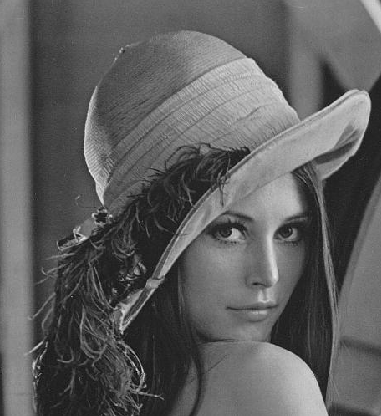 Effect: 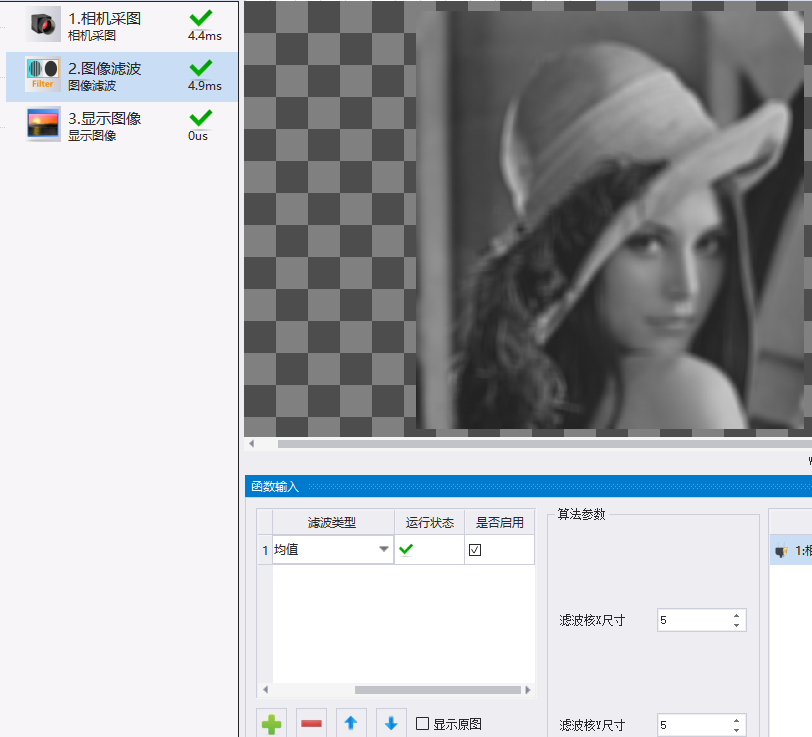 In the table on the left, you can add, delete, move up, and move down to set the filter type (multiple types can be set). On the right is the parameter setting when selecting different filter types. You can set the mask to select the enabled region (detection mask part) and the inverted region (shield mask part). 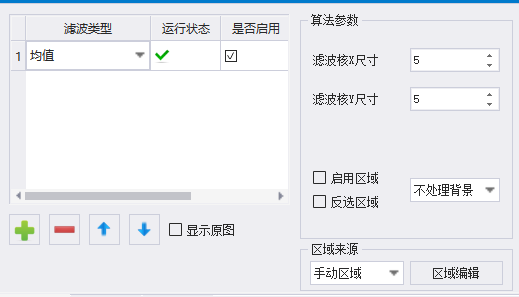 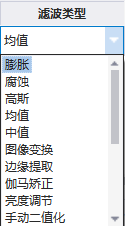 ### Usage Example [Record operation video] ## Parameter Configuration Description 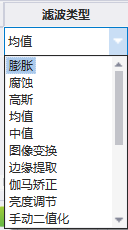 Dilation Filter: Gray dilation, set kernel size and kernel type, perform gray dilation on pixels; for example, select a rectangular, 5*5 kernel to perform gray dilation on the pixel at the red dot in the figure, and replace the pixel gray at the red dot with the maximum gray value in the surrounding 5*5 box.  Erosion Filter: Gray erosion, opposite to gray dilation, select the minimum surrounding gray for replacement. Gaussian Filter: Weighted average of neighborhood pixel gray values according to Gaussian distribution. Mean Filter: Take the average value of surrounding pixel gray values for replacement. Median Filter: Sort the surrounding pixel gray values and take the middle gray value for replacement. Image Transformation: This does not belong to image filtering, it is an operation such as rotating and mirroring the image. Edge Extraction: This does not belong to image filtering, set gray threshold for edge detection, as shown in the figure: 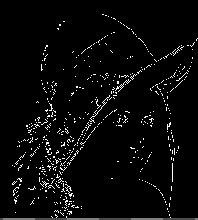 Gamma Correction: Enhance image, correct image brightness and contrast, match human visual perception characteristics, compensate for non-linear response of image acquisition / display devices. Gamma value γ>1, image becomes darker, Gamma value γ<1, image becomes brighter. Brightness Adjustment: Perform addition operation on original pixel gray directly in the original image to make the image brighter. Manual Binarization: Set pixels within the set threshold interval in the image to gray 255, and others to 0, as shown in the figure: 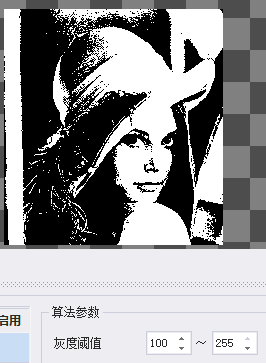 Adaptive Binarization: Local binarization for images with uneven illumination, avoiding "one size fits all" global threshold, optional mean weighting and Gaussian weighting methods. Denoise Binarization: Can filter some regions with insufficient area or excessive area. Similar to manual binarization function. Binarization Type: Manual White, indicating gray threshold interval is (Gray Threshold-255); Manual Black, indicating gray threshold interval is (0-Gray Threshold); Automatic White, indicating gray threshold interval is (128-255); Automatic Black, indicating gray threshold interval is (0-128); Area Screening: Retain gray values of areas meeting the interval, others set to 0. 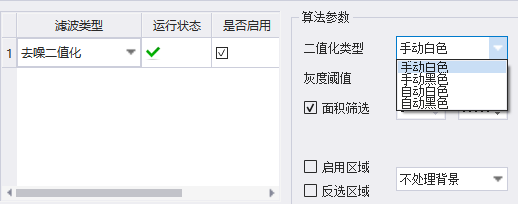 Region Pixel Filling: A mask must exist to decide where to fill pixels, and the pixels of the selected region are uniformly set to a fixed pixel value. Linear Gray Stretch: Linearly map the original gray interval of the image to the target gray interval (0-255). Histogram Equalization: Through non-linear gray value remapping, "stretch" and "uniformly distribute" the originally concentrated histogram to the entire 0~255 gray interval, so that the number of pixels at each gray level in the image is as close as possible, thereby maximizing the gray dynamic range and improving the global contrast. Image Self-Multiplication: A linear image enhancement, multiplying the pixels in the image by a coefficient to obtain a new image. Edge Sharpening: Enhance regions with abrupt gray changes in the image and suppress regions with gentle gray changes. Image Enhancement 1: Enhance high-frequency components (edges, details) of the image to improve image clarity and contrast. Preserve Boundary Denoising: The core uses mean filtering and retains edge information in the image. 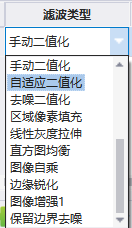 ## Output Description Running Result: Output True if filtering operation is completed, otherwise output False. Output Image: Monochrome image, color image is not supported for now. 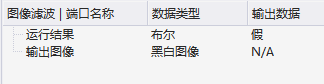 --- Click here to jump to the corresponding Chinese manual page: [Image Filtering](/doc/53)
唐红
2026年3月13日 09:03
转发文档
收藏文档
上一篇
下一篇
手机扫码
复制链接
手机扫一扫转发分享
复制链接
Markdown文件
PDF文档(打印)
分享
链接
类型
密码
更新密码